
Review assigned work
See the job details and schedule relevant to the signed-in engineer.
FIELD SERVICE · ENGINEER APP
Give engineers a focused mobile view of their assigned work, with job information, status controls, notes and a timer available in the field.
FIELD SERVICE AT WORK
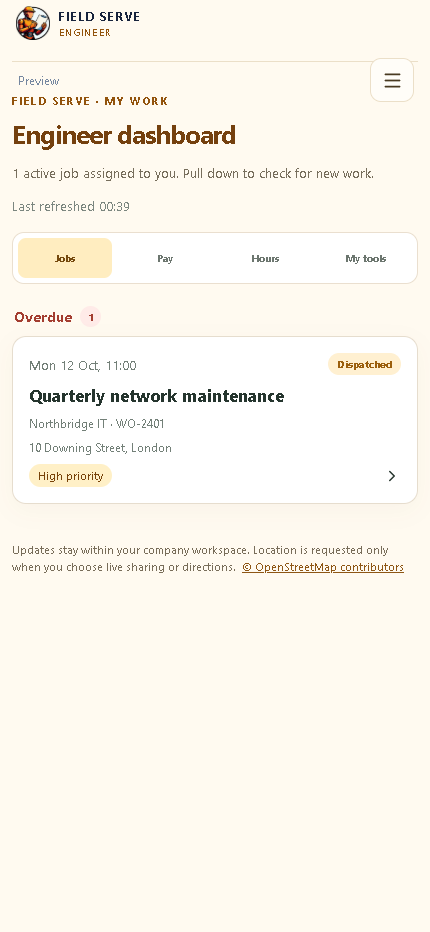
The engineer experience is designed around the work assigned to each person. Engineers can review job details, update progress and record time without navigating the wider CRM.
See the job details and schedule relevant to the signed-in engineer.
Record time against the job while the work is in progress.
Keep the office informed with progress and completion details.
Capture the outcome so the customer and service team have a clear history.
A FIELD DAY, STEP BY STEP
The mobile workspace is centred on work assigned to the signed-in engineer. The office plans the job; the engineer records what actually happened.
Review the scheduled window, customer and site address, job description, contact instructions, access notes and required checklist. Flag missing parts or unclear scope before setting off.
Update the job status and, where enabled, provide an arrival estimate. Location sharing should be deliberate, visible to the engineer and limited to the active work context.
Start the job timer when work begins, pause or stop it when appropriate, add clear notes and record checklist outcomes. Keep customer-visible updates separate from internal observations.
Set the correct completion status, summarise the outcome, record follow-up work and ensure the office can see whether the customer needs another visit or a communication.
BUILT FOR MOBILE CONDITIONS
Field teams work in bright light, cramped spaces and on networks that may be unreliable. Keep the day’s assignment, customer contact, address, notes and timer easy to find; use short labels and large touch targets; and avoid asking engineers to re-enter information already held on the job.
Before rollout, test the engineer route on the actual phones and browsers your team uses. Confirm sign-in, assignment visibility, status updates, timer behaviour, map directions, location permissions and how the app behaves when connectivity drops. If offline work is not supported for a task, give the team an agreed way to capture essential notes safely and reconcile them later.
Engineers should see the jobs and records they need for their work. Decide who may reassign a job, view wider customer history or correct a time entry, and make the escalation route clear before the first live dispatch.
ENGINEER APP QUESTIONS
The timer is intended to record time against the assigned work. Test start, pause, resume, stop and app-reopen behaviour on your supported devices before relying on recorded time for billing or payroll.
Location visibility is designed to be controlled for the job and by the engineer. Explain the purpose, start and stop behaviour, who can view it and the retention policy to staff before enabling live location features.
The Engineer role is intended to be restricted to assigned work. Confirm assignment rules and permissions during onboarding; do not use a demo workspace for real customer information.